Do you know how to migrate from EDMX to EF Core?
Loading last updated info...
Some older .NET Framework projects will have EDMX instead of the modern DbContext introduced in Entity Framework 4.1 back in 2012. EDMX projects often use ObjectContext (or an EDMX-generated context that wraps it) for a Database-First approach.
In this rule, we'll refer to ObjectContext (EF6-era API surface) and the EDMX-generated *Entities context (e.g. DataEntities). The generated context typically wraps ObjectContext and is what most application code interacts with.
This rule is written with modern .NET in mind (today that typically means the current LTS, e.g. .NET 10). The steps are still applicable if you’re targeting earlier versions of .NET. The key point is: EDMX is not supported by EF Core, so moving to modern .NET generally requires replacing EDMX-based data access.
Strategies
There are a few migration strategies, ranging from a full rewrite to a more in-place / staged migration (depending on the scale and complexity of the project). This rule describes an approach that balances how much code you rewrite with the benefits of modernisation.
The focus is to minimise delivery downtime during the migration.
When this approach is a good fit:
- Your project is large enough that a "big bang" rewrite is risky
- You want incremental releases while you modernise the data layer
- You're moving from .NET Framework/EF6 to modern .NET + EF Core
When this approach is not a good fit:
- The codebase is small and EDMX is the only blocker (go straight to modern .NET + EF Core)
- Your EDMX heavily relies on stored procedure/function imports or complex mappings and you can't budget for rework
This rule’s strategy includes:
- Abstract existing
ObjectContext/Entitiesclass with a custom interface (e.g.ITenantDbContext) - Reverse-engineer the database (scaffold)
- UI (preferred): EF Core Power Tools
- CLI (fallback):
dotnet ef dbcontext scaffold(prefer the current LTS EF Core, e.g. EF Core 10, or EF Core 8)
- Implement the interface from step 1 and refactor entities
- Review entities, adjust generated code and update
DbContext.OnConfiguring - Replace
ObjectSet<T>withDbSet<T>
- Address common refactor gotchas (see "Common gotchas" below): nullability differences, lazy loading, query translation, and performance
- Add a TechDebt comment and PBI when you need to defer deeper refactors - Do you know the importance of paying back Technical Debt?
- Update namespaces (for Entities, EF Core namespaces and removing legacy namespaces)
- Remove EF6 namespaces like
System.Data.Entityfrom files that are now using EF Core (otherwise you can get confusing type clashes and LINQ/runtime issues) - Add
Microsoft.EntityFrameworkCorenamespace - Update dependency injection
- Use modern
.AddDbContext()or.AddDbContextPool()
- Update migration strategy (from DB-first to Code-first)
- Adopt EF Core Migrations (
dotnet ef migrations add/dotnet ef database update) or your preferred migration approach; DbUp can still be useful, but it’s no longer “the default” once you’re Code-First - Remove EDMX completely (can be done sooner if migration is done in 1 go rather than in steps)
- Verify thoroughly (test, test, test...)
- Going from EDMX/EF6 to EF Core is a significant modernization with many under-the-hood changes
- Common issues are:
- Lazy loading
- Query translation differences (e.g. server-side vs client-side evaluation)
- Unsupported queries (code that was secretly running on .NET side instead of SQL Server)
- Performance issues because of highly complicated queries
- Incorrect results from EF Core query
In this rule, we'll only cover abstracting access to ObjectContext with a custom IDbContext and how to scaffold the DB. The rest of the steps require in-depth code review and may differ greatly between projects.
Optional upgrades:
- Upgrade to the current LTS .NET (e.g. .NET 10) if you’re on .NET Framework or older .NET
- Upgrade to the current LTS EF Core (e.g. EF Core 10) if you started on an older EF Core version
The namespace cleanup becomes unavoidable when you move to modern .NET and EF Core, and the solution is too complex to migrate in one go. For simpler projects, if EDMX is the only major blocking issue, go straight to the current LTS (.NET 10 + EF Core 10) or at least .NET 8 + EF Core 8.
NOTE: With some smart abstraction strategies, it is possible to refactor incrementally while still having a working application. This is only recommended for experienced developers in architecture and how EF operates to avoid bugs related to running 2 EF tracking systems. This will impact EF internal caching and saving changes.
1. Abstracting access to ObjectContext/Entities
Before starting, it’s important to note that EDMX isn't supported by EF Core, and ObjectContext is EF6-era API surface. If your goal is modern .NET + EF Core, you’ll ultimately need to replace EDMX-based data access. You can still wrap ObjectContext behind an interface to stage the migration, as many commonly used operations can still map cleanly to a DbContext-like API.
The wrapper below not only allows us to use ObjectContext in a cleaner way (see Rules to Better Clean Architecture) but also allows us to better manage the differences between ObjectContext and DbContext without needing to refactor the business logic.
using System.Data.Entity.Core.Objects;public interface ITenantDbContext{ObjectSet<Client> Clients { get; }int SaveChanges();Task<int> SaveChangesAsync(CancellationToken ct = default);}/// <summary>/// Implement DbContext as internal, so that external libraries cannot access it directly./// Expose functionality via interfaces instead./// </summary>internal class TenantDbContext : ITenantDbContext{private readonly DataEntities _entities;public TenantDbContext(DataEntities entities){_entities = entities;}public ObjectSet<Client> Clients => _entities.Clients;public int SaveChanges() => _entities.SaveChanges();public Task<int> SaveChangesAsync(CancellationToken ct = default) => _entities.SaveChangesAsync(ct);}
✅ Figure: Abstracting ObjectEntities behind an interface and using an interface to reduce the amount of issues while migrating.
Optional: Keep the idea, switch to an EF Core interface
To avoid confusion, don’t reuse the exact same interface name for both EF6 (ObjectSet<T>) and EF Core (DbSet<T>). Treat the EF Core interface as the “next stage” of the migration.
using Microsoft.EntityFrameworkCore;public interface ITenantDbContextEfCore{DbSet<Client> Clients { get; }int SaveChanges();Task<int> SaveChangesAsync(CancellationToken ct = default);}internal sealed class TenantDbContextEfCoreAdapter : ITenantDbContextEfCore{private readonly MyDbContext _db;public TenantDbContextEfCoreAdapter(MyDbContext db){_db = db;}public DbSet<Client> Clients => _db.Clients;public int SaveChanges() => _db.SaveChanges();public Task<int> SaveChangesAsync(CancellationToken ct = default) => _db.SaveChangesAsync(ct);}
Then register the interface adapter (after you’ve registered MyDbContext):
// Program.csbuilder.Services.AddScoped<ITenantDbContextEfCore, TenantDbContextEfCoreAdapter>();
NOTE: The changes made in this section are still compatible with .NET Framework, allowing us to deliver value to the clients while the above changes are made.
2. Scaffolding the DB
Now that we abstracted access to the data, it's time to scaffold the DB. The easiest way to do this is by using EF Core Power Tools.
Using EF Core Power Tools (UI)
- Right-click on the project | EF Core Power Tools | Reverse Engineer
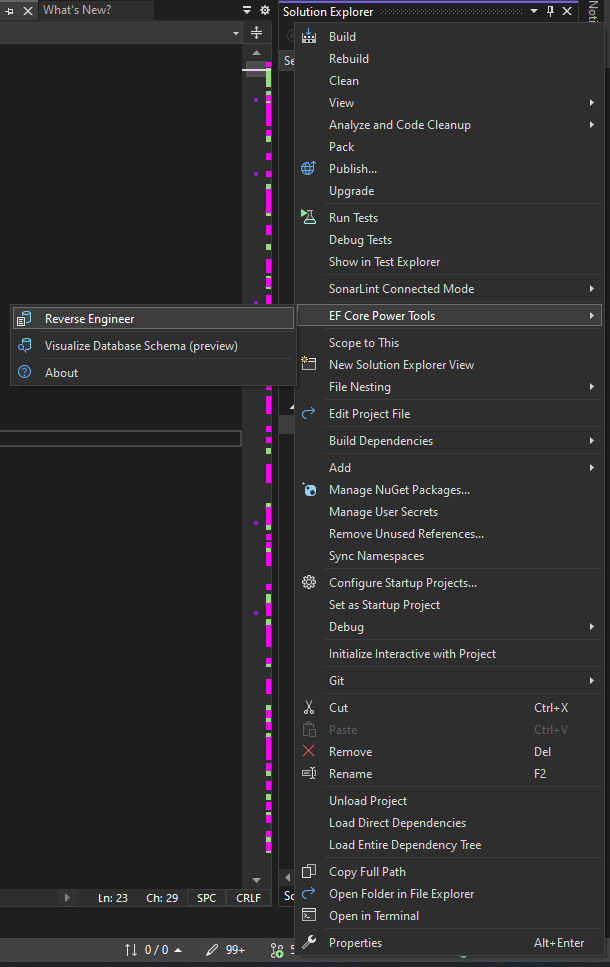
Figure: Select reverse engineer tool
- Choose your data connection and EF Core version
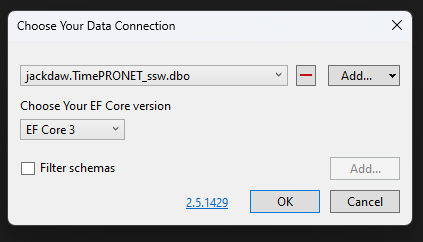
Figure: Data Connection
- Choose your database objects (tables, views, stored procedures, etc.)
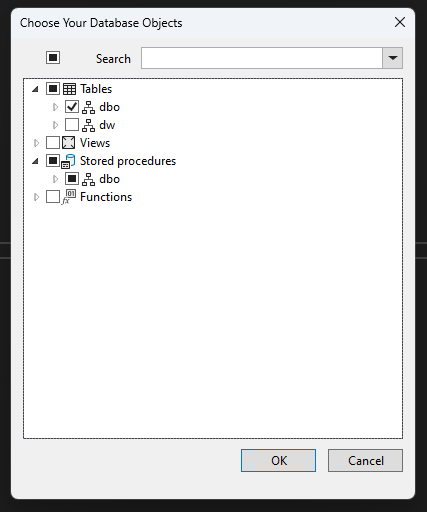
Figure: Database Objects
- Choose the settings for your project
- Recommended: Use DataAnnotation attributes to configure the model to reduce a lot of lines of code in DbContext
- Optional: Install the EF Core provider package in the project if you have not yet done that
- Optional: Use table and column names directly from the database if your existing code relies on that naming scheme
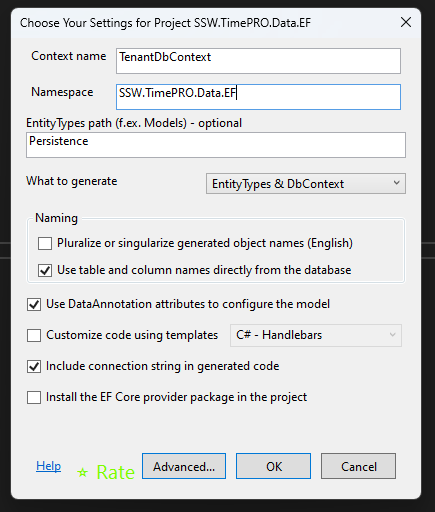
Figure: Settings for project
- Code will generate under the path we decided (EntityTypes path). In this case, it's
Persistencefolder
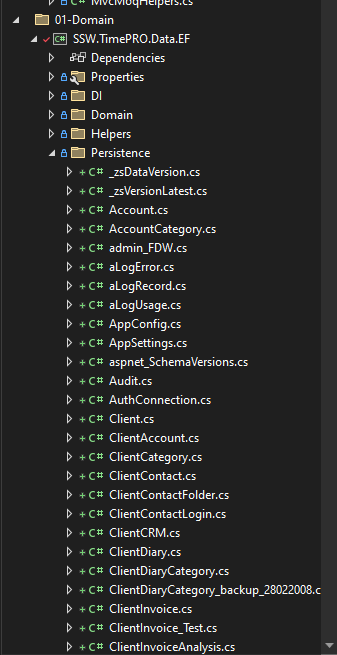
Figure: Settings for project
- A
DbContextclass will be auto-generated by EF Core Power Tools
Optional: Wire up dependency injection (EF Core)
Once you have a generated DbContext, register it with DI (and keep the connection string out of source control).
// Program.csbuilder.Services.AddDbContext<MyDbContext>(options =>options.UseSqlServer(builder.Configuration.GetConnectionString("MyDb")));
If performance is a concern and your DbContext is short-lived per request, consider pooling:
builder.Services.AddDbContextPool<MyDbContext>(options =>options.UseSqlServer(builder.Configuration.GetConnectionString("MyDb")));
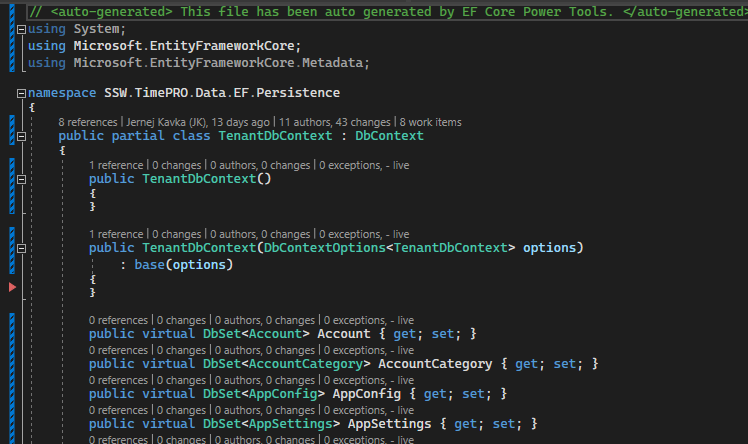
Figure: Settings for project
Scaffold using the EF Core CLI
If you can’t use the UI tool (or you want something repeatable for CI), you can reverse-engineer your database using the EF Core CLI.
- Install/update the EF Core CLI tooling (once per dev machine)
dotnet tool update --global dotnet-ef
Tip: Keep the dotnet-ef major version aligned with your EF Core major version (e.g. EF Core 10 → dotnet-ef 10.x).
- Add the EF Core packages (project file)
<ItemGroup><PackageReference Include="Microsoft.EntityFrameworkCore.Design" Version="10.*"><PrivateAssets>all</PrivateAssets></PackageReference><!-- Provider: choose the one you need (example: SQL Server) --><PackageReference Include="Microsoft.EntityFrameworkCore.SqlServer" Version="10.*" /></ItemGroup>
- Scaffold the context + entities
dotnet ef dbcontext scaffold `"Server=.;Database=MyDb;Trusted_Connection=True;TrustServerCertificate=True" `Microsoft.EntityFrameworkCore.SqlServer `--context MyDbContext `--output-dir Persistence/EntityTypes `--context-dir Persistence `--data-annotations `--use-database-names `--no-onconfiguring `--force
NOTE: Prefer <code>--no-onconfiguring</code> so the generated <code>DbContext</code> does not hard-code a connection string. Configure the connection string via configuration (e.g. appsettings, user secrets, environment variables, Key Vault) and DI instead. Never commit connection strings to source control.
NOTE: Reverse-engineering is great for tables/views, but EDMX often contains extras (e.g. stored procedure/function imports, complex mappings, or custom partial classes). Expect some manual work to recreate those patterns in EF Core.
Common gotchas (EF6/EDMX → EF Core)
Common API mappings (EF6/EDMX → EF Core)
| EF6 / EDMX | EF Core | Notes |
ObjectContext / EDMX-generated *Entities | DbContext | EDMX isn't supported by EF Core; you migrate to a DbContext. |
ObjectSet<T> | DbSet<T> | Common surface-area rename. |
| Lazy loading (default in many EF6 setups) | Explicit eager loading (Include/ThenInclude) or configured proxies | EF Core does not lazy-load by default. |
String-based includes (e.g. Include("Nav.Prop")) | Strongly-typed Include(x => x.Nav).ThenInclude(...) | Safer refactors, compiler-checked. |
Canonical functions / DbFunctions | EF.Functions and provider-specific translations | Function support differs by provider/version. |
Common symptoms and fixes
- Runtime LINQ translation exception → keep filtering/projection on the server, materialize (
ToListAsync) then finish in-memory only where intentional - Unexpected N+1 queries (after removing lazy loading) → add
Include/projection, or load related data explicitly - Performance regression → use
AsNoTracking()for read-only queries, simplify projections, consider split queries where appropriate - Different nullability/results → re-check model nullability, defaults, and query semantics; add targeted tests around edge cases
Namespace cleanup (EF6 → EF Core)
When you start moving files over, make sure you’re not mixing EF6 and EF Core namespaces.
// Remove EF6 namespaces from EF Core files// using System.Data.Entity;// using System.Data.Entity.Core.Objects;// Use EF Core namespacesusing Microsoft.EntityFrameworkCore;
Replace lazy loading with eager loading
EF Core doesn’t do lazy-loading by default (it requires explicit setup). If you were relying on EF6 lazy loading, switch to explicit eager loading.
// Example: load an Order with related entities up-frontvar order = await db.Orders.Include(o => o.Customer).Include(o => o.Lines).ThenInclude(l => l.Product).SingleAsync(o => o.Id == orderId, ct);
Query translation workaround (use client-side only where intentional)
If EF Core can’t translate part of a query to SQL (often revealed as a runtime exception), keep as much filtering as possible on the server, then materialize and finish the rest in memory.
// Server-side filtering first (fast)var rows = await db.Invoices.Where(i => i.CreatedUtc >= from && i.CreatedUtc < to).Select(i => new { i.CustomerId, i.Total }).ToListAsync(ct);// Client-side aggregation after materialization (intentional)var totalsByCustomer = rows.GroupBy(x => x.CustomerId).ToDictionary(g => g.Key, g => g.Sum(x => x.Total));
If you do use .AsEnumerable(), ensure it happens after you’ve narrowed down the data set:
var result = db.Orders.Where(o => o.Status == OrderStatus.Open).Select(o => new { o.Id, o.Lines }).AsEnumerable() // switches to client-side from here.Select(x => new { x.Id, LineCount = x.Lines.Count }).ToList();
EF Core migrations (Code-First)
Once you are Code-First, these are the common CLI commands:
# Create a migrationdotnet ef migrations add InitialCreate --context MyDbContext# Apply migrations to the databasedotnet ef database update --context MyDbContext# If you’re starting from an existing database and want a "baseline" migrationdotnet ef migrations add Baseline --context MyDbContext --ignore-changes# Generate an idempotent SQL script (useful for deployments)dotnet ef migrations script --context MyDbContext --idempotent --output migrations.sql
Testing checklist
Use this as a quick sanity checklist after scaffolding/refactoring:
- Verify key queries return the same results as before (especially edge cases)
- Validate nullability and default values (EF Core may interpret these differently)
- Check tracking behavior (read-only queries often want
AsNoTracking()) - Review transaction boundaries and concurrency (e.g. rowversion/timestamps)
- Baseline performance for critical pages/jobs (watch for N+1 and over-fetching)
- If adopting migrations, validate create/update scripts in a non-prod environment first
Resources
- EDMX porting walkthrough video - https://learn.microsoft.com/en-us/shows/on-net/migrating-edmx-projects-to-entity-framework-core
- Official porting docs (EDMX/EF6 → EF Core) - https://learn.microsoft.com/en-us/ef/efcore-and-ef6/porting/port-edmx?WT.mc_id=DP-MVP-33518
- Scaffolding / reverse engineering (current) - https://learn.microsoft.com/en-us/ef/core/managing-schemas/scaffolding/
- EF Core tools reference (
dotnet ef) - https://learn.microsoft.com/en-us/ef/core/cli/dotnet - Migrations overview (current) - https://learn.microsoft.com/en-us/ef/core/managing-schemas/migrations/
- Detailed EF6 vs EF Core differences - https://learn.microsoft.com/en-us/ef/efcore-and-ef6/porting/port-detailed-cases
Alternative
Community workaround (EF6 + EDMX on older .NET Core) - Walk-through: Using an Entity Framework 6 EDMX file with .NET Core | ErikEJ's blog
This post is a helpful reference if you need a temporary “bridge” to run existing EDMX-based code on .NET Core-era projects. That said, it keeps you on EF6/EDMX (not EF Core), so it’s generally not the direction you want for modern .NET long-term. Expect additional work to fully migrate to EF Core.
Limitations:
- EDMX is not supported in .NET Standard or .NET or any other SDK-style projects (required for .NET migrations)
- Requires a dedicated .NET Framework project that is not yet upgraded to an SDK-style project to generate and update EDMX, models and ObjectContext
- It keeps you on EF6/EDMX (not EF Core), which blocks many modernisation paths
- Built around older .NET Core-era constraints; not a recommended path for modern .NET (8/10+)
- ObjectContext (the core of EDMX) was slowly phasing out, being replaced by DbContext in 2012