This rule has been archived
Piers: We don’t use TFS anymore and even if we did, this rule looks very outdated.
Do you know how to refresh the cube?
Loading last updated info...
Note: These are instructions for TFS 2010 Beta 2
If you enter data and then look at reports you will see stale data!!!
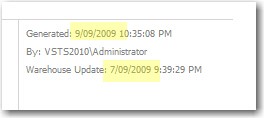
Figure: The report footer tells you that the TFS Warehouse is not up to date
The UI does not provide an easy option. However you have 2 *hard* ways of updating the TFS Data Warehouse.
Option 1 - Open SQL Management Studio and then force re-processing
Option 2 - Open the TFS Web Services in IE and then force processing (Recommended - see below)
More info on Option 2
Follow these instructions to reprocess the data warehouse using the web services (this took us a long time to work out):
- Open IIS Manager
- Go to "Team Foundation Server"
- Open the feature "Directory browsing"
- "Enable"
- Back to "Team Foundation Server"
- "Browse website"
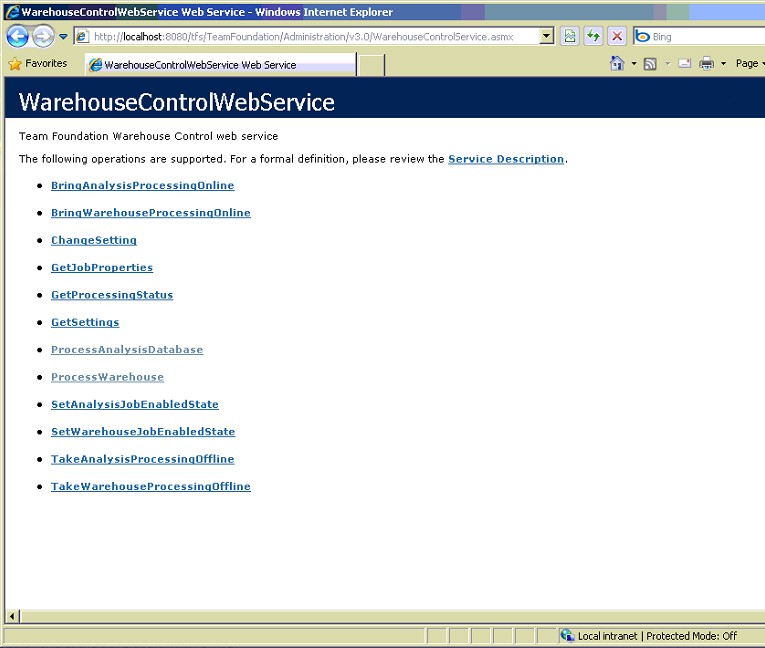
Figure: You will need to call 2 of these web services
- Invoke "ProcessWarehouse" with the parameter "DefaultCollection" (or whatever your collection is called)
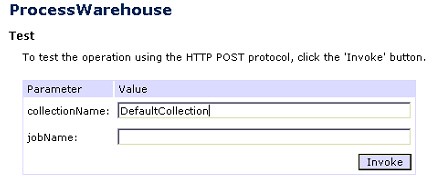
Figure: Call "ProcessWarehouse" web service with parameter "DefaultCollection"
- Invoke "ProcessAnalysisDatabase" with parameter "Full"
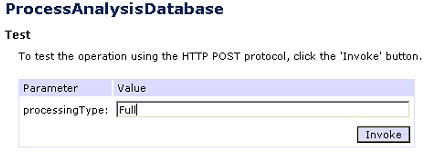
Figure: Call "ProcessAnalysisDatabase" with parameter "Full"
- Now once the the reprocess is completed, the reports are up to date
More info see the blog entry from Grant Holliday:http://ozgrant.com/2006/05/15/forcing-data-warehouse-update-for-tfs/
Note: We have a suggestion to the TFS team for this.
See the suggestion for a VS extension to Refresh Report Data